Remote Support

Technical Assistance
If you require remote assistance for one of our technicians to access your computer, please make arrangements first by contacting us. You will then be directed to come back to this page for further directions.
This page provides instructions on how to download “remote login” software so your technician can access your computer and help troubleshoot as needed. Please follow the below instructions carefully:
- STEP ONE: Download The Application
- STEP TWO: Save the file to your computer. Be sure to remember where you saved it to. A good place is on your desktop so it is easy to find.
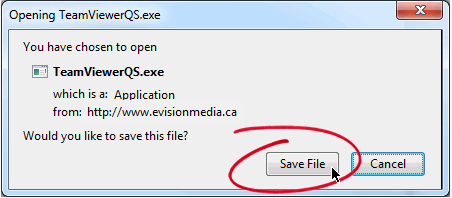
- STEP THREE: Find the saved file either on your desktop or in your File Explorer window and double click to run it:

A security warning may appear where you are asked to run the file. Click “Run” or “Ok” as prompted.
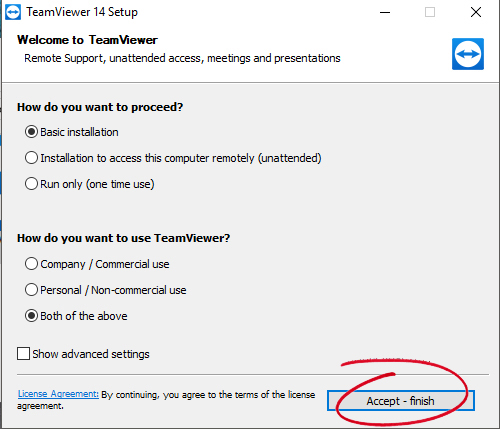
- STEP FOUR: Let your technician know what your ID and Password are that appear in the resulting window:
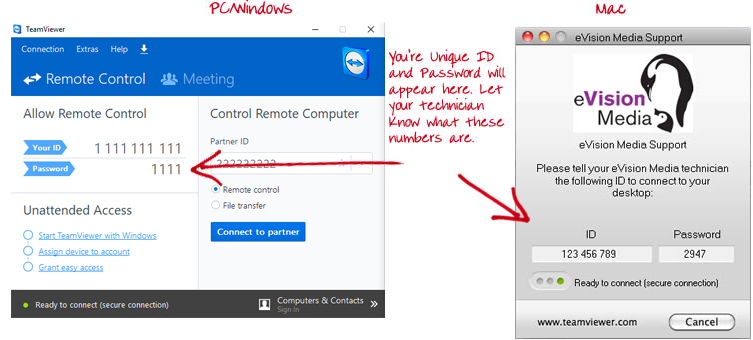
- STEP FIVE: Sit back and relax while your technician now has control of your mouse and can take care of whatever needs to be done.
At any time you can take control of the mouse back but we suggest you not touch your mouse unless instructed to so your technician can quickly and easily take care of matters.
- STEP SIX: Once completed, your technician will end the session and close the connection between your computers.
What Clients Say
Susan assisted me in moving a very fast-paced and financially successful business into one more aligned with the lifestyle and values that suited me. Frequent conversations with her assisted me in bridging my business from one model to another. She honored my values and intuition while keeping me up to date on workable strategies and helped me recognize the strengths in my business.
She is respectful, dependable and professional while also wielding a keen intuitive sense herself. She and her team are a delight to work with.
Sherry Phillips Swatek


Free Download: The Market Magnet Quick-Start Checklist:
This 25-point audit shows what to refine so your expertise draws ready-to-buy clients.
(Plus receive weekly brand marketing tips)
By submitting this form, you are consenting to receive marketing emails from: . You can revoke your consent to receive emails at any time by using the SafeUnsubscribe® link, found at the bottom of every email. Emails are serviced by Constant Contact
By clicking the Subscribe button, you agree to this site's Privacy Policy.
Your information is always kept safe.




Three Columns

eVisionMedia is a team of Programmers, SEO, Social Media and Marketing Specialists as well as Copywriters and Graphic Designers that specialize in brand identity, web and print media.
» Find out more


